Sound Design Engine.
Your racks, reborn.
A visual canvas to automate every parameter in your Ableton rack — at once. Draw, mutate, and shape sounds you've never heard from instruments you already own. One click. Straight into your clip. Done.
Watch Tutorial
Not just automation
One canvas.
Every parameter.
Total control.
Serum, Operator, Pigments, Phase Plant — it doesn't matter. Stride scans your rack, maps every parameter, and gives you a visual canvas to shape them all. Draw once, apply everywhere.
All Lanes, One Click
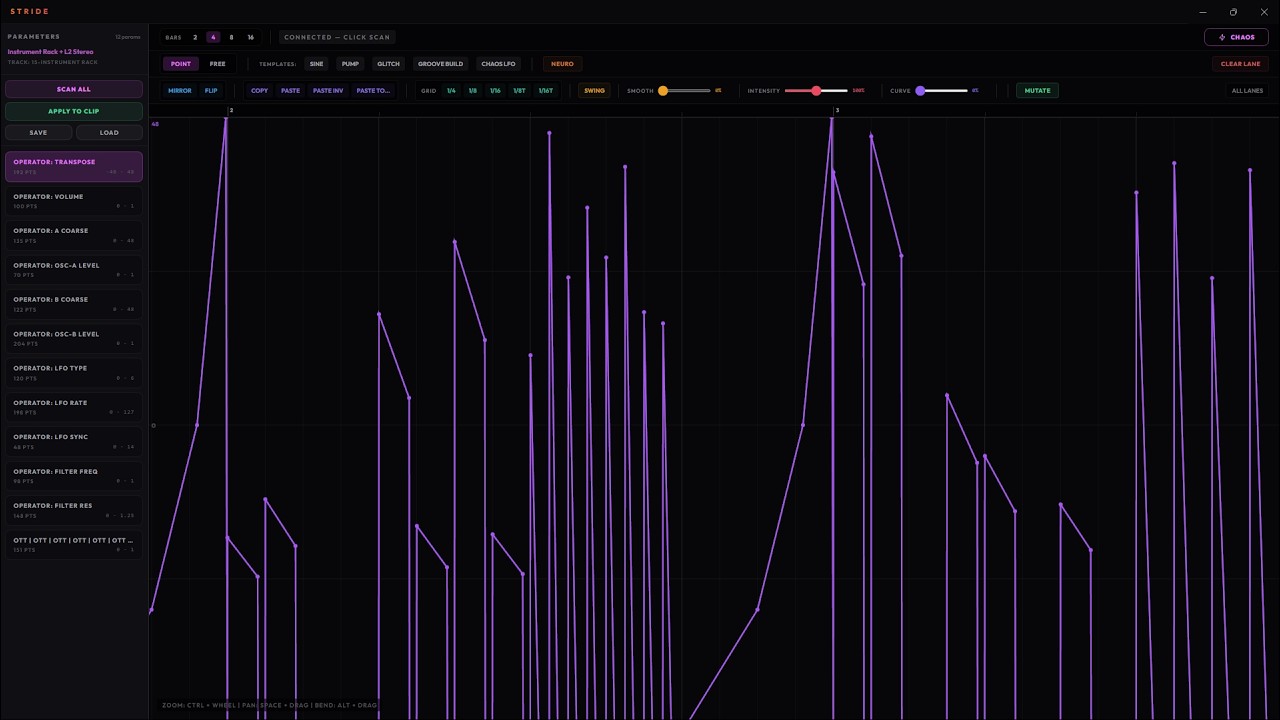
Toggle "All Lanes" and every tool — draw, mutate, mirror, smooth — hits every parameter simultaneously. 100+ lanes, zero repetition.
Mutate & Evolve
Hit Mutate to generate intelligent variations of any curve. Chop, relocate, flip sections — discover sounds you'd never draw by hand.
Chaos on Demand
Templates like Neuro, Chaos LFO, and Glitch fill your canvas instantly. Then fine-tune with Swing, Quantize, and Smooth sliders.
How It Works
Three steps. Zero friction.
Drop Stride on your track
Add the Max for Live device to any track with an instrument rack. Stride scans your rack and loads every parameter.
Shape your sound
Hit Chaos to fill every lane at once. Pick your favorite curve, then Bloom to make the rest complement it. Fine-tune with Smooth, Quantize, and Swing.

Apply to clip
One click writes all automation directly into an Ableton clip. Drag it onto your track. Hit play. The automation stays — Stride's job is done.

Automation Injection
Drop Stride on your track. It scans your rack, maps every parameter, and gives you a full visual canvas to draw complex automation curves — LFO sweeps, pump patterns, glitch sequences — compiled directly into your Ableton clip.
Your Rack, Your Sound
This isn't a sample library. Every sound comes from YOUR instruments with YOUR settings. Stride adds the movement that brings them to life.
Zero Setup. Zero Cloud.
No account. No internet. No data leaves your machine. Stride runs entirely inside Ableton via Max for Live. Buy it, drop it on a track, start designing. That's it.
Inside the Engine
Every tool you need. Nothing you don't.
The Canvas
See every parameter in your rack laid out as lanes. Draw automation with point, freehand, and bezier tools. Zoom, pan, select regions. A full DAW-grade automation editor that writes directly to your Ableton clip.
Instant Templates
Start with Sine, Pump, Glitch, Neuro, Chaos LFO, or Groove Build — one click fills your canvas with production-ready curves. Then fine-tune with Smooth, Intensity, and Curve sliders.
Generative Engine
Chaos fills every lane with random patterns. Pick the one you love, then Bloom reshapes all other lanes to complement it. Weave phase-shifts them so peaks never collide. Hit Mutate anytime to generate variations you'd never draw by hand. Coherent modulation across your entire rack — in clicks, not hours.
All Lanes. One Click.
Toggle All Lanes and every tool — draw, mutate, mirror, quantize, smooth — hits every parameter in your rack simultaneously. 100 parameters automated in the time it takes to do one.
100+
parameters
1
click
0
repetition
Works with any Ableton instrument rack
Before & After
Same rack. Same patch. Just Stride.
Serum Pad — flat
No automation
Same pad — after Stride
With automation
Operator Bass — static
No automation
Same bass — after Stride
With automation
Audio coming soon — record when ready
Does Stride work for you?
Check before you buy
Yes — Stride works
- ✓Ableton Live 11 or 12 Suite
- ✓Ableton Live 11/12 Standard with the Max for Live add-on
- ✓macOS 11 or later (Intel + Apple Silicon)
- ✓Windows 10 or 11
No — won't help you
- ✗Ableton Live Lite or Intro (no M4L support)
- ✗FL Studio
- ✗Logic Pro / GarageBand
- ✗Cubase, Nuendo
- ✗Pro Tools, Reaper, Bitwig, Studio One
- ✗Any other DAW
Stride uses Max for Live to talk directly to Ableton's rack parameters. That's the tech under the hood — it's the reason Stride can't work in any other DAW, and why Live must be Suite or Standard with M4L.
Be first.
Founding-member pricing for the first 100 buyers. After that it's $59 — then $79. Lock in the lowest price while it lasts.
One-time purchase. 2 machines. Free updates in v1.x. First 100 buyers lock in the lowest price — goes to $59 after.
Ableton Live 11+ required. Stride does not work with FL Studio, Logic, Cubase, or any other DAW. No exceptions.
Works with Ableton Live 11+ Suite or Standard + Max for Live.
Your instruments.
Infinite variations.
Drop Stride on a track. Shape your sound. Apply to clip. That's the loop.