A smart, musical automation engine that pushes the limits of sound design.
Stride lets your VSTs and Ableton devices move together in one place, at once. Explore endless variations from the gear you already own. Every click reveals a fresh direction. Keep what works, regenerate the rest, then mutate and edit every automation by hand.
VST3 + AU + Ableton Devices · Audio In for guitar, vocals, hardware & recordings
- ●Stride VST + StrideBridge included

Three sound-design experiments
Broken drums destroyed and rebuilt into fractured percussion. A whole palette made from one falling water drop. One simple signal pushed into heavy feedback. Plus 15 Ableton Racks pre-mapped to Stride FX and 4 StrideChains.
Three engines. One evolving sound design playground.
Shape the harmonics, push the effects, and let three independent patterns play off each other. Explore with Stride to discover fresh sounds, mudpies and sequences from the same patch.
It comes with 22 StrideChains: sound design systems ready to load and explore.
Sold by Paddle.com Market Ltd. Paying above accepts the Terms and the Refund Policy.
In the wild
Already in their sessions.
Hundreds of producers are already exploring with Stride.
Stride is your best friend for sound design's happy accidents and complex modulations. It let you re-discover your entire plugins library in a new way, like if they were completely new instruments and tools, again.

Oblium
Experimental & Psychedelic
Stride really is a fun thing. I love that it has these movements that you easily can switch and adjust to your taste.
It makes modulation much fun. Kind of a controlled random chaos Pandora's box.
I love that it helps you to create some nasty things even if you're kind of uninspired.

Brojanowski
Dark Prog
Stride really changes the sound design game for me. It makes it really fast and easy to add insane modulation to all my devices at once. Been getting crazy results playing around with it!

Andromeda Colt
Bass Music Producer
As someone who usually couldn't be bothered with sound design sessions, Stride really inspired me to dive back into designing my own sounds. It hits the sweet spot by automating the tedious parts and supporting my creative workflow, freeing me up to create the craziest sounds.

Absalon
IDM & Bass Music
Stride gives me more chances to stumble into sounds I never would have built on purpose, without losing control of where they go. I can map a huge number of parameters, hear dozens of evolving possibilities incredibly fast, then keep, edit and push the ones that actually work. It turns complex modulation from something time-consuming into a fast, playable creative process. For anyone who loves experimental sound design and constantly asking “what happens if I do this?”, it's brilliant.

Derek Oswald
AltWire
Stride is always an adventure. Great fun as a creative experimental tool but also a serious sound design machine, producing genuinely unique (and highly usable) results.
John Anderson
Sound Designer
I'm an electronic music creator that delves more into the experimental side of things and Stride is, in my opinion, perfect for that. Never a dull moment & a lot of fun to use. Lot's of happy accidents are guaranteed! Highly recommended 👍

Stan Magendanz
Electronic Music Creator
I use Stride to resample a generative hybrid modular setup on the fly. Cut it via Push2 and Simpler and in seconds start jamming around the sound texture of the modular as it proceeds generating sound stream.

iloveERROR
Hybrid Modular
Stride does something no other plugin currently does, opening up complex modulation possibilities with incredible ease. It's simply in a league of its own bringing something completely new and innovative to the table. On top of that, it's easily one of the most fun and addictive plugins I've ever used, with a super smooth UI and top-tier support. I've already used it on 4 out of my last 5 finished projects!

Odditi
Halftime Bass
Stride Engine has helped reopen my creativity. It has added infinite doors of sound possibilities to my work flow. I use it in all of my projects.

Lucas Ferrell
Sound Designer
The ease of creating chaos, something slowly evolving and something loopable is the biggest draw to Stride. It does all 3, and it makes them all very easy to commit to a project which helps with someone having difficulty committing to automation.

Z
Sound Designer
Joe had an amazing idea and made it a reality! I took a chance on it very early on and am so glad I did! In the past, if I had issues or questions with the interface, he was available for chat! I can't think of anyone doing customer service like that. He takes your feedback and works with you. It just keeps getting better! As far as Stride, and Stride Fx, they can be as minimal or drastic as you want. I can't speak highly enough for the products. This is a sound designer's dream come true:)
Arthur
Early Adopter
After modulating my hardware recordings, I was curious about other ways to continue modulation within the DAW. I was looking for a plugin that could emulate the feeling of altering various knobs simultaneously, then I found Stride. I've only used it a few days, but I can say it's been fitting in nicely to my workflow, in that it provides another layer of multi-modulation on top of my audio signals. Last thing I'll say is that its surprisingly ergonomic - theres a ton of complexity that it can handle and the plugin makes that complexity relatively simple.

Mark Mohr
Techno
BROOOO ! Stride is EXACTLY the move to break out of an inspiration blockade. Instead, just open up Stride, let the modulation go absolutely wild, record the whole thing, and then pick out the gems from the chaos. 🤯 The beauty of it is that you no longer have to actively try to come up with a good idea. You create the conditions for things to happen that you might never have programmed intentionally.

Findelkind
Braingames Records
For me, working with high bpm music production, discovering this tool has been absolutely wonderful. It’s essential for anyone who enjoys creating all their own effects in an "organic" and innovative way. it’s never been easier to just drop in an oscillator and let the magic happen.

Major Drop
Psytrance
Works with the instruments you already own
Stride VST hosts VST3 instruments and effects inside it, in any DAW. In Ableton Live, StrideBridge maps your Ableton devices onto the same canvas, and prints that motion into a clip when you want it. It hosts VST3 anywhere and AU on macOS. No VST2.
You already have everything you need.
Your favorite synths.
Your trusted effects.
One variation is easy.
Twenty is the work.
Stride writes a fresh one across every mapped lane with every click. Keep what works. Regenerate the rest.
It doesn't replace any of it. It reveals more of what's already there.
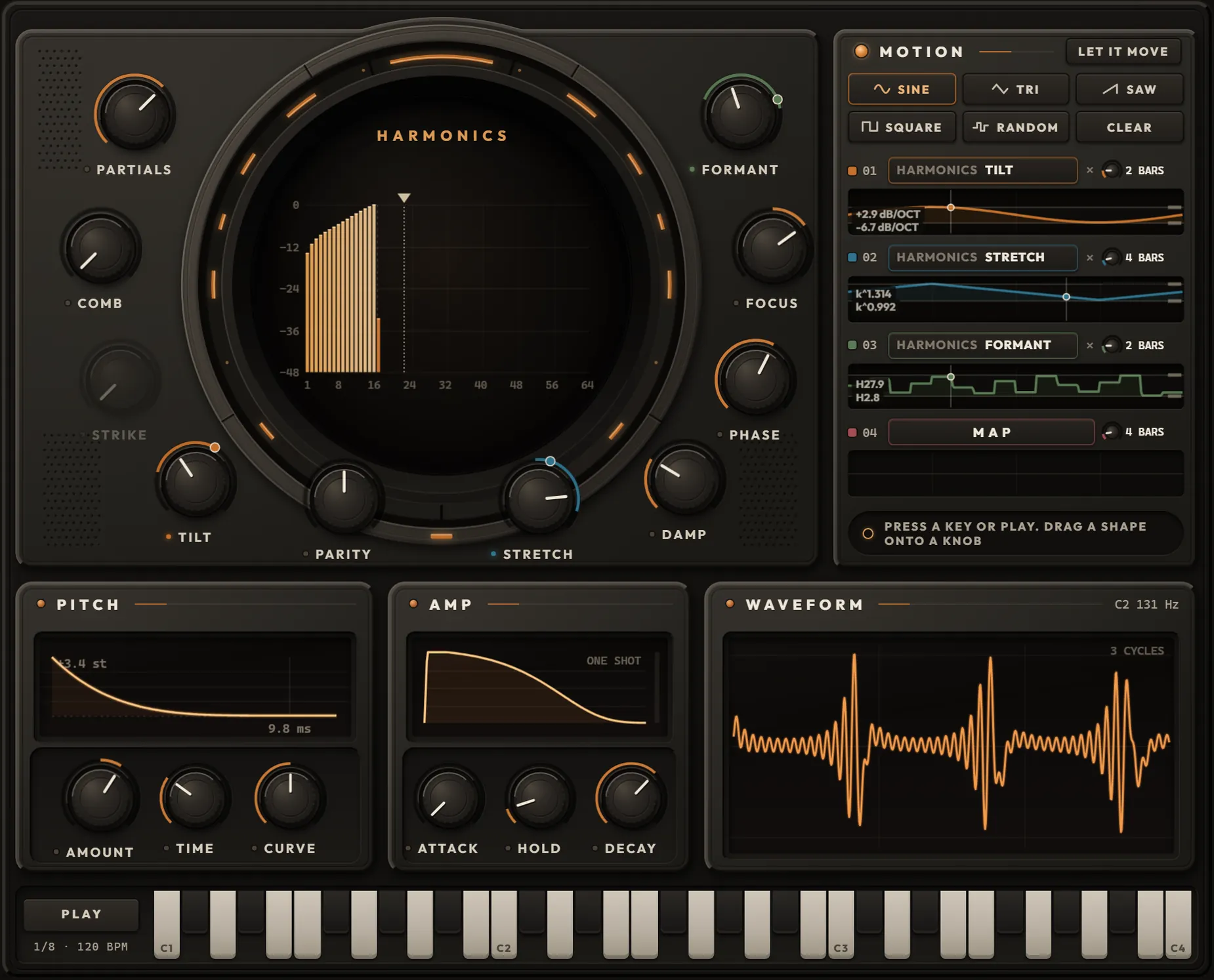
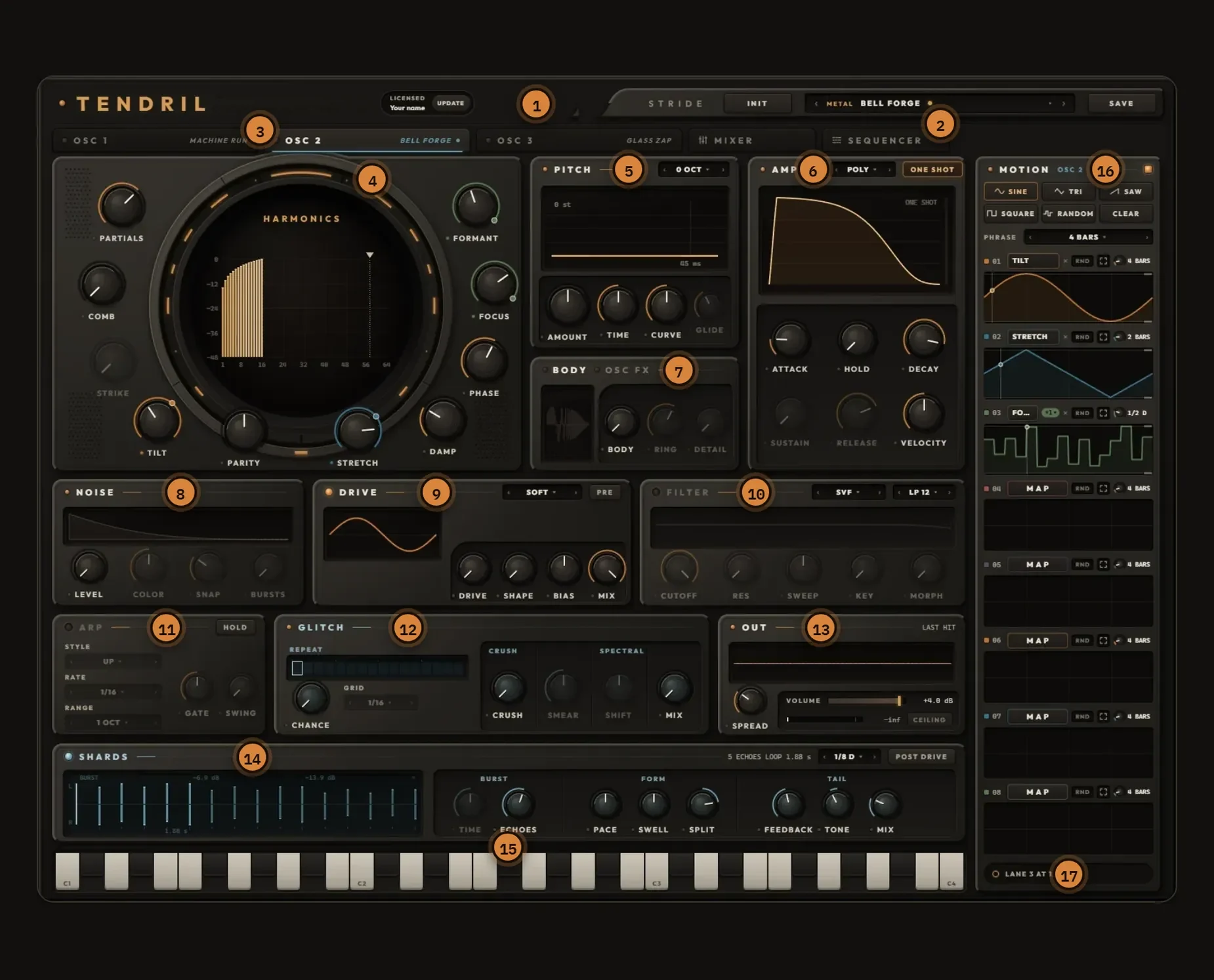
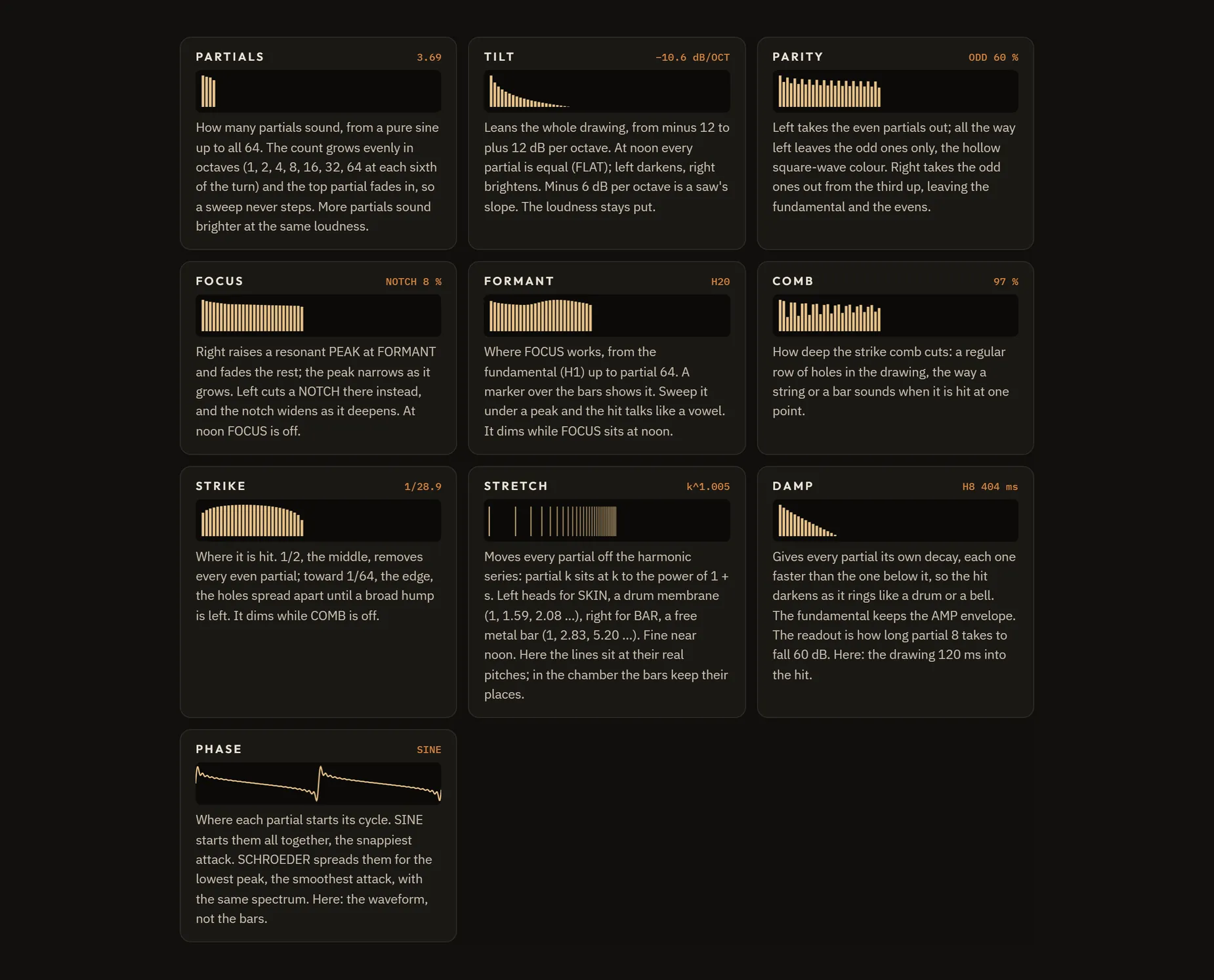
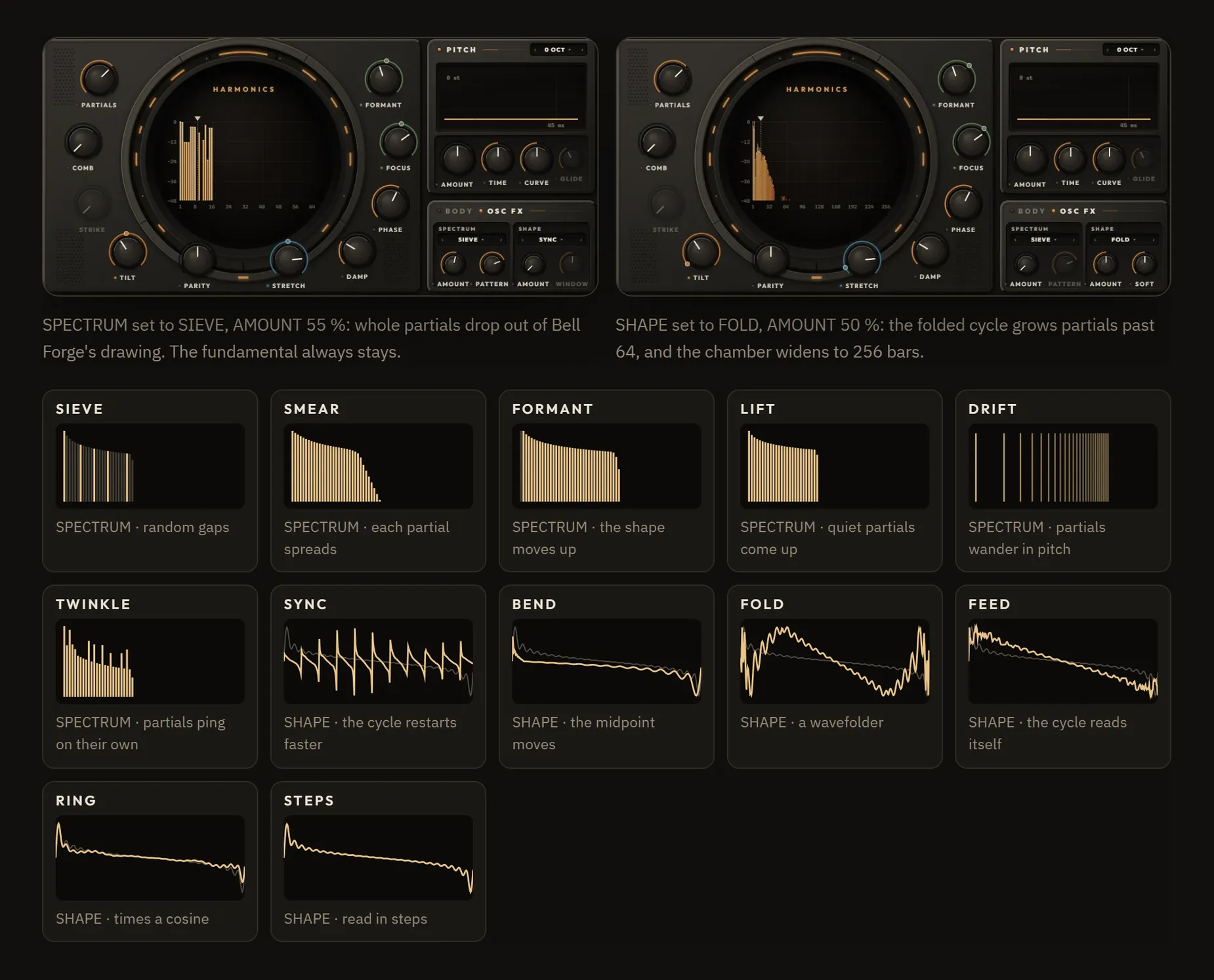
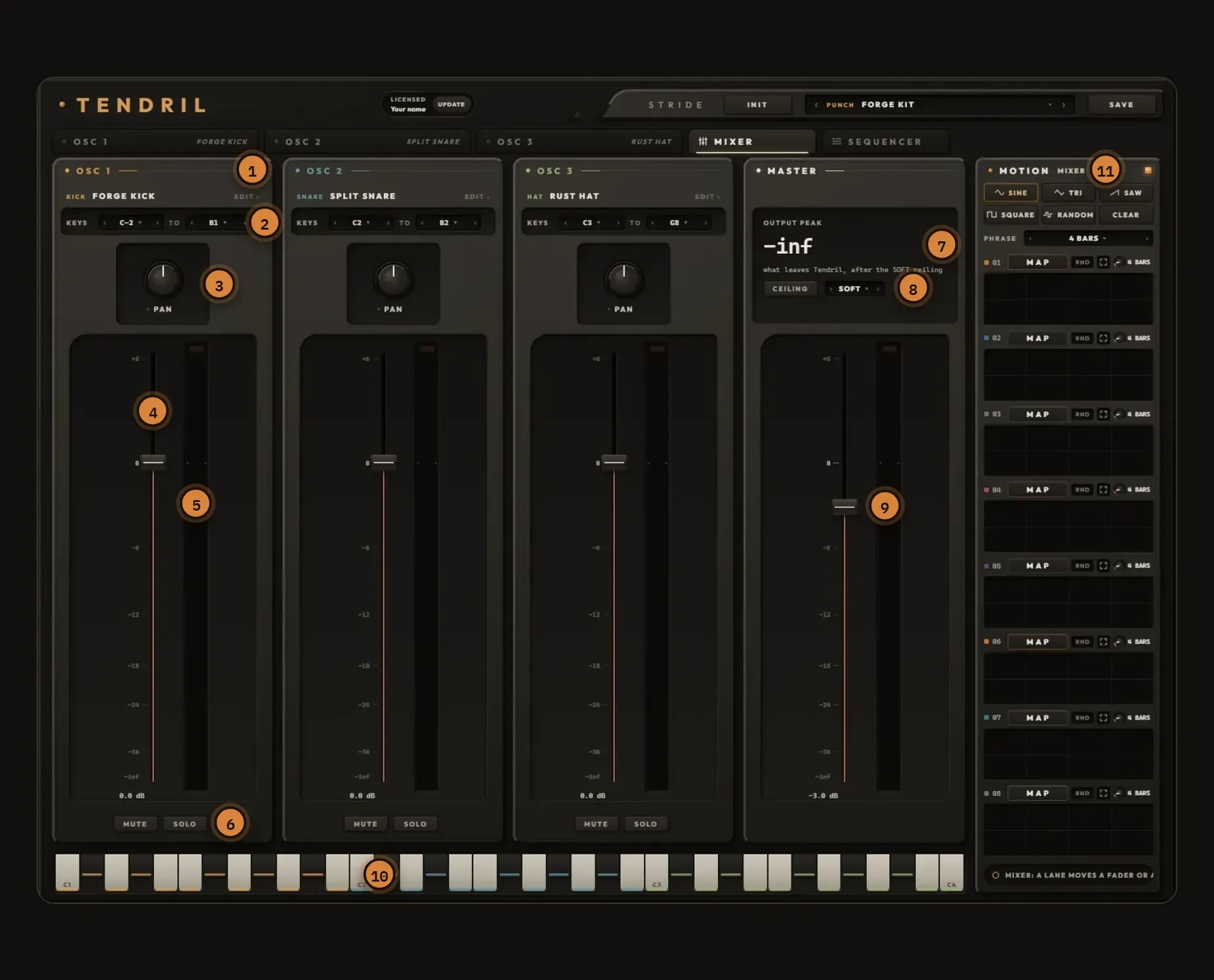
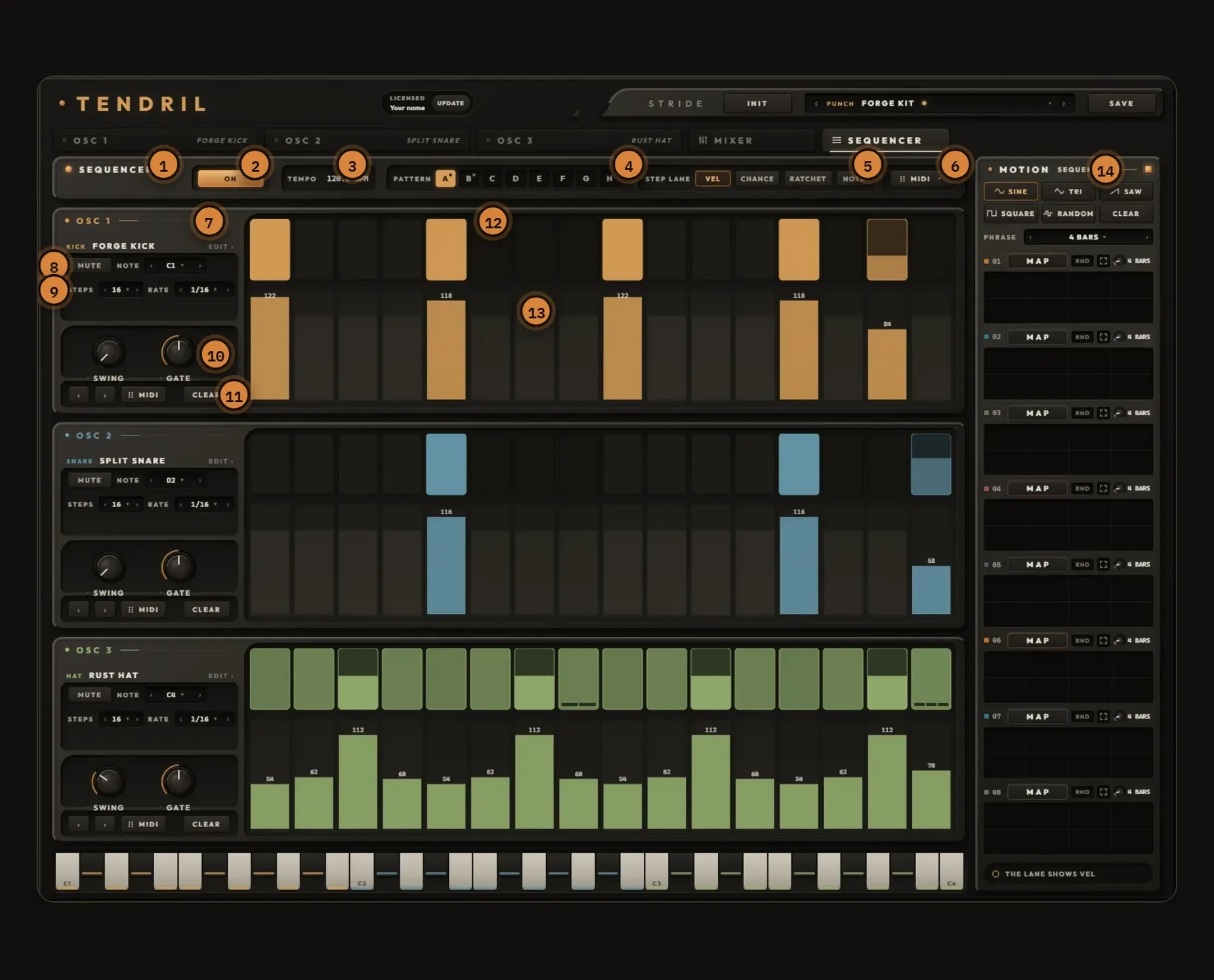
TENDRILThree engines. One evolving sound design playground.
Shape the harmonics, push the effects, and let three independent patterns play off each other. Explore with Stride to discover fresh sounds, mudpies and sequences from the same patch.
Stride lets you try fresh motion across the parameters you map, lock what works and regenerate the rest.
It comes with 22 StrideChains: sound design systems ready to load and explore.
Sold separately to Stride owners. A special offer is available after you buy Stride.
Route your hardware, guitar, or vocals through your favorite FX chain.
Put it in motion.
Send the signal into Stride through your DAW, load the VST3 effects you already trust, and map the knobs you want moving. The chain keeps shifting while you play, with a fresh variation on every click.
An FX-only chain becomes a rig. You play the take, Stride moves every knob you mapped.
Your pedalboard, with motion
Amp sim into filter into delay, every mapped knob riding its own curve while you play. Generate new motion until the take lands.
Vocal chains that perform
Draw a delay throw exactly where the phrase needs it, sweep a filter across the line, and try new motion until the chain sings back. Keep what fits the performance.
Your hardware. Your favorite FX chain. In motion.
Route your favorite synth or drum machine into Stride, then build the VST3 effects chain you have always wanted around it. Every mapped knob moves while you play.
Audio In is part of Stride VST, new in 1.2. You route audio in with standard DAW routing, and the effects chain is hosted inside Stride: VST3 anywhere, AU on macOS. Not Pro Tools (AAX).
In every DAW
One click. Every lane comes alive.
Map the knobs you want to move. One click writes a different evolving curve on every lane, up to 32 bars deep. Click again for a completely new take, as many times as it takes.
Chaos
One click. Every lane filled.
Stamps multi-layer wave noise onto every unlocked parameter. Smooth, organic, never the same twice.
Good for · dense evolving textures, ambient pads, slow-motion sound design.
Neuro
Gnarly. Random. Musical.
Random shape chunks - dotted ramps, hard chops, hyper-stutters, syncopated drops - across every unlocked lane.
Good for · neuro & DnB bass, dubstep wobbles, aggressive design that locks to the grid.
Reflector
Mirrored motion. Coherent set.
Pairs every two lanes - base plus a value-flipped mirror - so the sound folds in on itself. One click.
Good for · modulation in opposition: filter opens / resonance drops, drive up / volume down.
Sample & Hold
Polyrhythmic stepped motion.
Per-lane stepped-random staircase. Each lane picks its own rate - straight and triplet, down to 1/32.
Good for · glitchy stepped textures, sequenced modulation, rhythmic motion without drawing a step.
Variations on demand
Every button is a variation.
Less tweaking. More discovering. Run the generators, mutate, reshape: a whole new set of curves on every click, no two ever the same.
Every generator is a fresh take
Chaos, Neuro, Reflector, S&H - same sound, four totally different directions. Try all four in seconds.
Apply, reshape, repeat
Hit a generator, hear it, go again. Every pass writes fresh motion across the whole chain, no two the same.
Mutate & Prism for finer takes
Found a curve you love? Hit Mutate to vary it, or Prism to grow siblings across every other lane, anchors locked. New in 1.2: Keyswitch Mode puts the toolbox on one octave. Chaos on C, Mutate on F#. The notes stay silent, the tools fire: play them live, or record the triggers into a clip and every pass writes a fresh take.
One plugin. Your whole rig.
Stride VST hosts your instruments and effects in series, inside itself. Map knobs from every device and modulate them together, in any DAW. In Ableton Live, StrideBridge puts your Ableton devices on the same canvas.
Every knob on every device is fair game. Draw one curve on the filter, another on the delay feedback, another on the drive - all moving together, in time.
Explore across your VSTs + Ableton devices
In Ableton Live, StrideBridge adds the set's own devices to the same canvas. One click moves your hosted chain and your Ableton devices together.
VSTs inside. Ableton devices through Bridge.
Stride VST modulates the instruments and effects you load inside it, in any DAW: VST3 anywhere, AU on macOS, no VST2. In Ableton Live, StrideBridge opens the canvas past the hosted chain and maps your Ableton devices too, so both move on the same click. Want it written into the clip itself? Press INJECT on the bridge, below.
Stride VST + StrideBridge · one-time purchase
Get Stride for $99
One purchase · yours for goodStride VST + StrideBridge
- ✓Stride VST: modulate your instruments in any VST3 DAW (Cubase, Studio One, FL, Reaper, Bitwig, Ableton) and in Logic as AU
- ✓StrideBridge: reach your Ableton devices, and print the motion into a clip when you want it
- ✓Free v1.2 just landed: Keyswitch Mode, Audio In, note-triggered motion, half-screen layouts
- ✓The full canvas, all generators, on Windows & macOS
- ✓One-time purchase. No subscription.
Stride VST + StrideBridge
Three engines. One evolving sound design playground.
Shape the harmonics, push the effects, and let three independent patterns play off each other. Explore with Stride to discover fresh sounds, mudpies and sequences from the same patch.
It comes with 22 StrideChains: sound design systems ready to load and explore.
VST3 + AU + Max for Live · not Pro Tools (AAX)
Stride is a one-time purchase. The Experimental Collection is an optional add-on. Not Pro Tools (AAX). Third-party plugins shown are sold separately.
In Ableton, it reaches everything.
Stride moves the plugins you load inside it. Drop StrideBridge on a track and your set's own devices join the same canvas, so the whole thing rides one set of curves.
The workflow
Drop Stride on a track
Load the instruments and effects you want to move inside it.
Drag StrideBridge onto any track
One per set. It passes audio straight through, so it can sit anywhere.
Map the knobs you want moving
Touch a knob inside Stride, or press MAP LIVE and click a knob anywhere in your set.
Draw the motion, or generate it
Draw a curve by hand, or hit a generator and get a different one on every lane at once.
Press Play
The knobs ride your transport, locked to the clock. Export and Freeze render offline, so press INJECT or resample the track to carry that movement into a file.
Want the curves as real automation you can edit by hand, keep after removing Stride, or capture in an export? Select a clip and press INJECT on the device. StrideBridge moves Live’s own devices in real time, and Export, Freeze and Bounce all render offline, so INJECT or a real-time resample is what carries that movement into the rendered file. Anything running inside Stride itself renders normally.
Reaches the whole set
Map knobs on any track, in place, with nothing hosted inside Stride first. Operator, Roar, Auto Filter, the lot. Live's MIDI effects too.
Racks travel
Save Stride and its Ableton devices together as a rack. The lanes find their knobs wherever that rack lands, in this set or the next one.
Made for Ableton, only Ableton
StrideBridge is a Max for Live device. It needs Ableton Live 11+ (Suite, or Standard with the Max for Live add-on) and doesn't run anywhere else. Stride itself runs in any VST3 DAW, and in Logic as AU.
StrideBridge is included with Stride. One purchase, $99.
FAQ
The questions everyone asks
What do I get for $99?▾
Which DAWs does Stride VST work in?▾
Can Stride VST modulate Ableton devices?▾
Can't I just draw automation by hand?▾
How is this different from an LFO tool?▾
Can I play it live?▾
Is there a free trial?▾
Mac and Windows?▾
Can I get a refund?▾
Somewhere in your setup
is a sound you haven't met.
24 hours, fully unlocked, on your own tracks. Then one purchase: $99.